POI的使用 [JAVA_Apache]POI套件的使用_產出EXCEL文件_儲存格的樣式使用方法(CellStyle) 使用儲存格 設定為日期格式
public static void training5() throws IOException {
  Workbook wb = new HSSFWorkbook();
     //or Workbook wb = new XSSFWorkbook();
     CreationHelper createHelper = wb.getCreationHelper();
     Sheet sheet = wb.createSheet("new sheet");

     // Create a row
     Row row = sheet.createRow(0);
     // as a date.
     Cell cell = row.createCell(0);
     cell.setCellValue(new Date());

     CellStyle cellStyle = wb.createCellStyle();
     cellStyle.setDataFormat(
         createHelper.createDataFormat().getFormat("m/d/yy h:mm"));

     cell = row.createCell(1);
     cell.setCellValue(new Date());
     cell.setCellStyle(cellStyle);

     //you can also set date as java.util.Calendar
     cell = row.createCell(2);
     cell.setCellValue(Calendar.getInstance());
     cell.setCellStyle(cellStyle);

     // Write the output to a file
     FileOutputStream fileOut = new FileOutputStream("workbook.xls");
     wb.write(fileOut);
     fileOut.close();
 }
public static void training6() throws IOException {
  Workbook wb = new HSSFWorkbook();
  // or Workbook wb = new XSSFWorkbook();
  CreationHelper createHelper = wb.getCreationHelper();
  Sheet sheet = wb.createSheet("new sheet");
  // Create a row
  Row row = sheet.createRow(0);
  Cell cell = row.createCell(0);
  // 第一種:日期格式

  cell.setCellValue(new Date());
  CellStyle cellStyle = wb.createCellStyle();
  DataFormat format = wb.createDataFormat();//
  cellStyle.setDataFormat(format.getFormat("yyyy年m月d日"));
  cell.setCellStyle(cellStyle);

  // 第二種:保留兩位小數格式
  cell = row.createCell(1);
  cell.setCellValue(1.2);
  CellStyle cellStyle2 = wb.createCellStyle();
  cellStyle2.setDataFormat(HSSFDataFormat.getBuiltinFormat("0.00"));
  cell.setCellStyle(cellStyle2);
  // 第三種:貨幣格式
  cell = row.createCell(2);
  cell.setCellValue(20000);
  CellStyle cellStyle3 = wb.createCellStyle();
  DataFormat format3 = wb.createDataFormat();
  cellStyle3.setDataFormat(format3.getFormat("$#,##0"));
  cell.setCellStyle(cellStyle3);
  // 第四種:百分比格式
  cell = row.createCell(3);
  cell.setCellValue(20);
  CellStyle cellStyle4 = wb.createCellStyle();
  cellStyle4.setDataFormat(HSSFDataFormat.getBuiltinFormat("0.00%"));
  cell.setCellStyle(cellStyle4);
  // 第五种:中文大寫格式
  cell = row.createCell(4);
  cell.setCellValue(20000);
  CellStyle cellStyle5 = wb.createCellStyle();
  DataFormat format5 = wb.createDataFormat();
  cellStyle5.setDataFormat(format5.getFormat("[DbNum2][$-804]0"));
  cell.setCellStyle(cellStyle5);
  // 第六種:科學格式
  cell = row.createCell(5);
  cell.setCellValue(20000);
  CellStyle cellStyle6 = wb.createCellStyle();
  cellStyle6.setDataFormat(HSSFDataFormat.getBuiltinFormat("0.00E+00"));
  cell.setCellStyle(cellStyle6);
  // 第七種:自訂格式
  cell = row.createCell(6);
  cell.setCellValue(-20000);
  CellStyle cellStyle7 = wb.createCellStyle();
  DataFormat format7 = wb.createDataFormat();
  cellStyle7.setDataFormat(format7.getFormat("$#,##0.00_ ;[red](-$#,##0.00)"));
  cell.setCellStyle(cellStyle7);
  // Write the output to a file
  FileOutputStream fileOut = new FileOutputStream("workbook.xls");
  wb.write(fileOut);
  fileOut.close();
 }
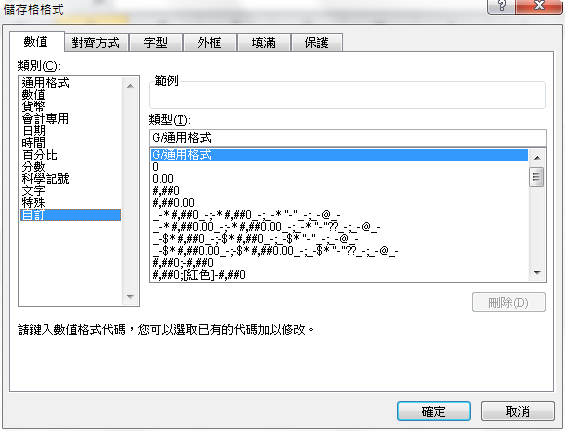
格式可找在excel裡的儲存格樣式->自訂 如圖
文章標籤
全站熱搜

 ZK (1)