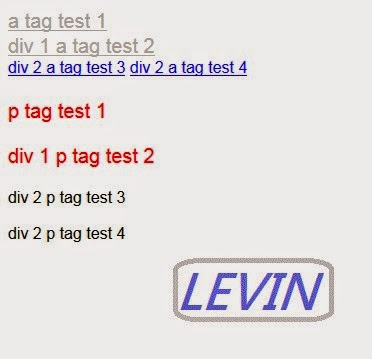
支援CSS3 以上
用法: :only-of-type
說明:
依元素是唯一的子元素則套用
css定義:
父元素裡其中一個的a tag唯一子元素是則套用
a:only-of-type{
font-size: 20px;
color: silver;
}
父元素裡其中一個的p tag唯一子元素是則套用
p:only-of-type{
font-size: 20px;
color: red;
}
注意事項:
程式:
<!DOCTYPE html>
<html>
<head>
<title>css3 Selector only-of-type 套用樣式</title>
<meta http-equiv="Content-Type" content="text/html; charset=BIG5">
<style type="text/css">
a:only-of-type{
font-size: 20px;
color: silver;
}
p:only-of-type{
font-size: 20px;
color: red;
}
</style>
</head>
<body>
<a href="#1">a tag test 1</a>
<div id="div1">
<a href="#1">div 1 a tag test 2</a>
</div>
<div id="div2">
<a href="#1">div 2 a tag test 3</a>
<a href="#1">div 2 a tag test 4</a>
</div>
<p>p tag test 1</p>
<div id="div3">
<p>div 1 p tag test 2</p>
</div>
<div id="div4">
<p>div 2 p tag test 3</p>
<p>div 2 p tag test 4</p>
</div>
</body>
</html>
a:only-of-type 父元素裡其中一個的a tag唯一子元素是則套用
p:only-of-type 父元素裡其中一個的p tag唯一子元素是則套用
有子元素
的父元素 子元素數量 是否符合
body6
a tag 1個 是
p tag 1個是
div tag 4個否
div11
a tag 1個 是
div22
a tag 2個 否
div31
p tag 1個是
div42
p tag 2個否
圖1:
PG Levin Li 發表在 痞客邦 留言(0) 人氣(6)

支援CSS3 以上
用法: :only-child
說明:
父元素的是唯一的子元素則套用
css定義:
父元素唯一的子元素是且是a tag則套用
a:only-child{
font-size: 20px;
color: silver;
}
父元素唯一的子元素是且是p tag則套用
p:only-child{
font-size: 20px;
color: red;
}
注意事項:
程式:
<!DOCTYPE html>
<html>
<head>
<title>css3 Selector only-child 套用樣式</title>
<meta http-equiv="Content-Type" content="text/html; charset=BIG5">
<style type="text/css">
a:only-child{
font-size: 20px;
color: silver;
}
p:only-child{
font-size: 20px;
color: red;
}
</style>
</head>
<body>
<a href="#1">a tag test 1</a>
<div id="div1">
<a href="#1">div 1 a tag test 2</a>
</div>
<div id="div2">
<a href="#1">div 2 a tag test 3</a>
<a href="#1">div 2 a tag test 4</a>
</div>
<p>p tag test 1</p>
<div id="div3">
<p>div 1 p tag test 2</p>
</div>
<div id="div4">
<p>div 2 p tag test 3</p>
<p>div 2 p tag test 4</p>
</div>
</body>
</html>
a:only-child 唯一的子元素且是a tag則套用
p:only-child 唯一的子元素且是p tag則套用
有子元素
的父元素 子元素數量 是否符合
body6否
div11是 div 1 a tag test 2
div22否
div31是 div 1 p tag test 2
div42否
圖1:
PG Levin Li 發表在 痞客邦 留言(0) 人氣(37)

支援CSS3 以上
用法: :nth-last-of-type(n)
說明:
n 為第幾個子元素,
依tag為第幾個子元素套用樣式
此nth-last-of-type為:子元素從後開始算依tag區分
css定義:
從後算來第2個a tag子元素
a:nth-last-of-type(2){
font-size: 20px;
color: silver;
}
從後算來第4個p tag子元素
p:nth-last-of-type(4){
font-size: 20px;
color: red;
}
注意事項:
只算第幾個子元素,分tag。
只要有父子關系,都會被定義。
不分tag
PG Levin Li 發表在 痞客邦 留言(0) 人氣(126)

支援CSS3 以上
用法: :nth-last-child(n)
說明:
n 為第幾個子元素,
依tag為第幾個子元素套用樣式
此nth-last-child為:子元素從後開始算
css定義:
從後算來第2個子元素且是a tag
a:nth-last-child(2){
font-size: 20px;
color: silver;
}
從後算來第4個子元素且是p tag
p:nth-last-child(4){
font-size: 20px;
color: red;
}
注意事項:
只算第幾個子元素,不分tag。
只要有父子關系,都會被定義。
有分tag
PG Levin Li 發表在 痞客邦 留言(0) 人氣(67)

支援CSS3 以上
用法::nth-of-type(n)
說明:
n 為第幾個子元素,
依tag為第幾個子元素套用樣式
css定義:
a Tag 為第二個子元素 則套用樣式
a:nth-of-type(2){
font-size: 20px;
color: silver;
}
p Tag 為第四個子元素 則套用樣式
p:nth-of-type(4){
font-size: 20px;
color: red;
}
注意事項:
有分tag算第幾個子元素。
只要有父子關系,都會被定義。
不分tag參考:
PG Levin Li 發表在 痞客邦 留言(0) 人氣(19)
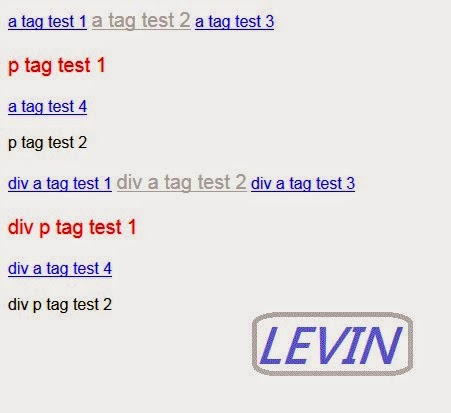
支援CSS3 以上
用法::nth-child(n)
說明:
n 為第幾個子元素,
為第幾個子元素套用樣式
css定義:
a Tag 為第二個子元素 則套用樣式
a:nth-child(2){
font-size: 20px;
color: silver;
}
p Tag 為第四個子元素 則套用樣式
p:nth-child(4){
font-size: 20px;
color: red;
}
注意事項:
只算第幾個子元素,不分tag。
只要有父子關系,都會被定義。
有分tag參考:
PG Levin Li 發表在 痞客邦 留言(0) 人氣(63)

支援CSS3 以上
用法::not(selector)
說明:
not(selector)
那些不要套用樣式
css定義:
是a tag 不要套用樣式
:not(a){
font-size: 30px;
color: red;
}
注意事項:
程式:
<!DOCTYPE html>
<html>
<head>
<title>css3 Selector not(selector) 套用樣式</title>
<meta http-equiv="Content-Type" content="text/html; charset=BIG5">
<style type="text/css">
a{
font-size: 20px;
color: silver;
}
:not(a){
font-size: 30px;
color: red;
}
</style>
</head>
<body>
<a href="#1">a tag test 1</a>
<div>
<a href="#2">a tag test 2</a>
<a href="#3">a tag test 3</a>
<p>p tag test 1</p>
</div>
<a href="#4">a tag test 4</a>
<p>p tag test 2</p>
</body>
</html>
圖1:
PG Levin Li 發表在 痞客邦 留言(0) 人氣(30)

支援CSS3 以上
用法::last-child
說明:
a tag 是最後一個子元素
css定義:
a tag是最後一個子元素 套用樣式
a:last-child {
font-size: 20px; 字型20像素
color: red; 字顏色red
background-color: yellow; 背景色 yellow
}
注意事項:
a tag 是最後一個子元素,
如果在div裡面的最後一個子元素,也算喔~
程式:
<!DOCTYPE html>
<html>
<head>
<title>css3 Selector last-child 套用樣式</title>
<meta http-equiv="Content-Type" content="text/html; charset=BIG5">
<style type="text/css">
a:last-child {
font-size: 20px;
color: red;
background-color: yellow;
}
</style>
</head>
<body>
<a href="#1">a tag test 1</a>
<div>
<a href="#2">a tag test 2</a>
<a href="#3">a tag test 3</a>
</div>
<a href="#4">a tag test 4</a>
</body>
</html>
會有二個tag被套用~
a3及a4
圖1:
PG Levin Li 發表在 痞客邦 留言(0) 人氣(87)

支援CSS3 以上
用法::last-of-type
說明:
此tag的最後一個tag套用樣式
css定義:
p tag 的最後一個tag套用樣式
p:last-of-type {
background: lime;
}
注意事項:
程式:
<!DOCTYPE html>
<html>
<head>
<title>css3 Selector last-of-type 套用樣式</title>
<meta http-equiv="Content-Type" content="text/html; charset=BIG5">
<style type="text/css">
p:last-of-type {
background: lime;
}
</style>
</head>
<body>
<h5>明細</h5>
<p>name:</p>
<p>所在地:</p>
<p>css3 Selector last-of-type 套用樣式</p>
</body>
</html>
圖1:
PG Levin Li 發表在 痞客邦 留言(0) 人氣(2)

支援CSS3 以上
用法::target
說明:
target 當被連接到的元素
配合用 a tag href 用#後加入元素id
css定義:
:target {
border: 2px solid blue;
background-color: gainsboro;
}
注意事項:
程式:
<!DOCTYPE html>
<html>
<head>
<title>css3 Selector target 套用樣式</title>
<meta http-equiv="Content-Type" content="text/html; charset=BIG5">
<style type="text/css">
:target {
border: 2px solid blue;
background-color: gainsboro;
}
</style>
</head>
<body>
<p><a href="#catalog1">商品 1</a></p>
<p><a href="#catalog2">商品 2</a></p>
<p></p>
<p></p>
<p></p>
<p></p>
<p></p>
<p></p>
<p id="catalog1"><b>介紹 商品 1...</b></p>
<p id="catalog2"><b>介紹 商品 2...</b></p>
</body>
</html>
圖1:
PG Levin Li 發表在 痞客邦 留言(0) 人氣(104)

 ZK (1)