用途:
例外處理。
預防錯誤後的處理。
說明:
try{
//在此區的程式,如果出現錯誤,就會被catch
}catch(e){
//發生錯誤後,有處理的區域
}finally{
//最後程式結尾處理的區域。
//(不管程式有沒有錯,都會到此區)
}
程式範例:
<script type ="text/javascript">
try{
//在此區的程式,如果出現錯誤,就會被catch
test[2]="test";
}catch(e){
//發生錯誤後,有處理的區域
alert("發生錯誤:"+e);
}finally{
//最後程式結尾處理的區域。
//(不管程式有沒有錯,都會到此區)
alert("結束程式");
}
</script>
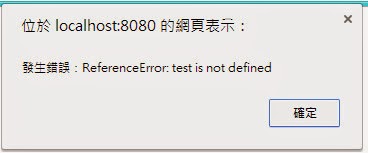
測試結果:
PG Levin Li 發表在 痞客邦 留言(0) 人氣(140)

用途:
設定經過多少時間再呼叫方法。
延遲時間呼叫方法。
反覆呼叫方法。
說明:
setInterval(要執行的方法,設定秒數);
程式範例:
<body>
<script type ="text/javascript">
//方法
function setText(){
var value = textID.value;
textID.value = value + "^^";
}
//設定1秒呼叫方法,只呼叫一次方法。
setInterval("setText()",1000);
</script>
<input type="text" id="textID">
</body>
測試結果:
PG Levin Li 發表在 痞客邦 留言(0) 人氣(579)

用途:
設定經過多少時間再呼叫方法。
延遲時間呼叫方法。
說明:
setTimeout(要執行的方法,設定秒數);
程式範例:
<body>
<script type ="text/javascript">
//方法
function setText(){
var value = textID.value;
textID.value = value + "^^";
}
//設定1秒呼叫方法,只呼叫一次方法。
setTimeout("setText()",1000);
</script>
<input type="text" id="textID">
</body>
測試結果:
PG Levin Li 發表在 痞客邦 留言(0) 人氣(948)

條件判斷式 ? 為真true : 為假false
範例:
字串變數 = a > b ? "是" : "否"
var a = 10;
var b = 5;
var str = a > b ? "是":"否";
document.write(str);
結果:
PG Levin Li 發表在 痞客邦 留言(0) 人氣(4,939)
a+=5 ,同a = a+5
a-=5 ,同a = a-5
a*=5 ,同a = a*5
a/=5 ,同a = a/5
範例:
var a =10;
document.write("a+=5為:"+(a+=5));
document.write("<br>" );
document.write("a-=5為:"+(a-=5));
document.write("<br>" );
document.write("a*=5為:"+(a*=5));
document.write("<br>" );
document.write("a/=5為:"+(a/=5));
document.write("<br>" );
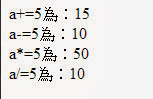
結果:
PG Levin Li 發表在 痞客邦 留言(0) 人氣(17)
a && b
a || b 說明:
!a 說明:
a && b 說明:
&&稱為:and ,且
如果a和b為true,則為true
表列:
true && true = true
true && false = false
false && true = false
false && false = false
a || b 說明:
||稱為: or ,或
如果a和b為其中一為true,則為true
表列:
true || true = false
true || false = true
false || true = true
false || false = true
!a 說明:
!稱為: xor ,互斥或
反向的意思,如果a為true,則反向為false;
表列:
!true = false
!false = true
範例:
var a =10;
document.write("a等於50 且 a小於等於50:" );
if(a==50 && a<=50){
document.write("是" );
}else{
document.write("否" );
}
document.write("<br>" );
document.write("a不等於50 且 a大於等於50:" );
if(a!=50 && a>=50){
document.write("是" );
}else{
document.write("否" );
}
document.write("<br>" );
document.write("a不等於50 :" );
if( !(a==50) ){
document.write("是" );
}else{
document.write("否" );
}
document.write("<br>" );
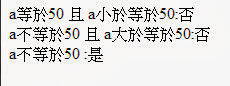
結果:
PG Levin Li 發表在 痞客邦 留言(0) 人氣(17)
== ,是否等於
> ,大於
>= ,大於等於
< ,小於
<= ,小於等於
!= ,不等於
範例:
var a =10;
document.write("a是否等於50:" );
if(a==50){
document.write("是" );
}else{
document.write("否" );
}
document.write("<br>" );
document.write("a是否大於50:" );
if(a>50){
document.write("是" );
}else{
document.write("否" );
}
document.write("<br>" );
document.write("a是否小於50:" );
if(a<50){
document.write("是" );
}else{
document.write("否" );
}
document.write("<br>" );
document.write("a是否大於等於50:" );
if(a>=50){
document.write("是" );
}else{
document.write("否" );
}
document.write("<br>" );
document.write("a是否小於等於50:" );
if(a<=50){
document.write("是" );
}else{
document.write("否" );
}
document.write("<br>" );
document.write("a是否不等於50:" );
if(a!=50){
document.write("是" );
}else{
document.write("否" );
}
document.write("<br>" );
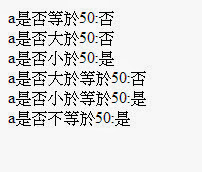
結果:
PG Levin Li 發表在 痞客邦 留言(0) 人氣(3)
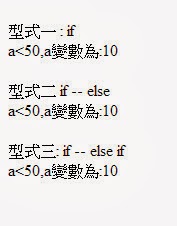
var a =10;
//型式一 : if
document.write("<br>型式一 : if<br>");
if(a>50){
document.write("a>50,a變數為:"+a);
}
if(a<50){
document.write("a<50,a變數為:"+a);
}
document.write("<br>");
//型式二 if -- else
document.write("<br>型式二 if -- else<br>");
if(a>50){
document.write("a>50,a變數為:"+a);
}else{
document.write("a<50,a變數為:"+a);
}
document.write("<br>");
//型式三 if -- else if
document.write("<br>型式三: if -- else if<br>");
if(a>50){
document.write("a>50,a變數為:"+a);
}else if(a<50){
document.write("a<50,a變數為:"+a);
}
結果:
PG Levin Li 發表在 痞客邦 留言(0) 人氣(30)

var a = "a";
var b = 1;
if(typeof(a) == 'undefined'){
document.write("a變數不存在<br>");
}else{
document.write("a變數存在<br>");
}
if(typeof(b) == 'undefined'){
document.write("b變數不存在<br>");
}else{
document.write("b變數存在<br>");
}
if(typeof(c) == 'undefined'){
document.write("c變數不存在<br>");
}else{
document.write("c變數存在<br>");
}
結果:
PG Levin Li 發表在 痞客邦 留言(0) 人氣(3,979)
[JavaScript]取得input的value
有各種方法來獲得輸入文本框的值:
方法 1:
使用 id 名稱來取:
document.getElementById('input text id').value
返回input的value
範例: document.getElementById("searchTxt").value;
方法 2:
使用 class 名稱來取:
document.getElementsByClassName('input text class_name')[取第幾個].value
返回多筆input的為list
範例:
取回第一筆資料
document.getElementsByClassName("searchField")[0].value;
方法 3:
使用 html tag 名稱來取:
document.getElementsByTagName('tag_name')[取第幾個].value
返回多筆input的為list
範例:
取回第一筆資料
document.getElementsByTagName("input")[0].value;
方法 4:
使用 name 名稱來取:
document.getElementsByName('name')[取第幾個].value
範例:
取回第一筆資料
document.getElementsByName("searchTxt")[0].value;
方法 5:
使用選擇器(selector)
document.querySelector('selector').value
範例:
selected by id
document.querySelector('#searchTxt').value;
selected by class
document.querySelector('.searchField').value;
selected by tagname
document.querySelector('input').value;
selected by name
document.querySelector('[name="searchTxt"]').value;
方法 6:
document.querySelectorAll('selector')[取第幾個].value
範例:
selected by id
document.querySelectorAll('#searchTxt')[0].value;
selected by class
document.querySelectorAll('.searchField')[0].value;
selected by tagname
document.querySelectorAll('input')[0].value;
selected by name
document.querySelectorAll('[name="searchTxt"]')[0].value;
支持
Browser 方法 1 方法 2 方法 3 方法 4 方法 5/6
IE6 Y(Buggy) N Y Y(Buggy) N
IE7 Y(Buggy) N Y Y(Buggy) N
IE8 Y N Y Y(Buggy) Y
IE9 Y Y Y Y(Buggy) Y
FF3.0 Y Y Y Y N
FF3.5/FF3.6 Y Y Y Y Y
FF4b1 Y Y Y Y Y
GC4/GC5 Y Y Y Y Y
Safari4/Safari5 Y Y Y Y Y
Opera10.10/
Opera10.53/ Y Y Y Y(Buggy) Y
Opera10.60
註:
IE=Internet Explorer
FF=Mozilla Firefox
GC=Google Chrome
Y=YES,N=NO
有用的鏈接:
要看到這些方法的支持,所有的錯誤,包括更多的細節,點擊這裡 http://quirksmode.org/dom/core/
靜態和實時節點列表之間的區別,請點擊這裡 http://www.nczonline.net/blog/2010/09/28/why-is-getelementsbytagname-faster-that-queryselectorall/
參考
http://stackoverflow.com/questions/11563638/javascript-get-input-text-value
PG Levin Li 發表在 痞客邦 留言(0) 人氣(8,539)

 ZK (1)