因為工作關係,所以公司指派我找了一個套件,公司要我摸圖表的部分,我就稍微找一下台灣南部區域的溫度表來寫個小範例嚕 <!DOCTYPE html> <html> <head> <meta http-equiv="Content-Type" content="text/html; charset=utf-8"> <link href="http://ajax.googleapis.com/ajax/libs/jqueryui/1.8/themes/base/jquery-ui.css" rel="stylesheet" type="text/css"/> <script src="http://ajax.googleapis.com/ajax/libs/jquery/1.4/jquery.min.js"></script> <script src="http://code.highcharts.com/highcharts.js"></script> <script type="text/javascript"> $(function () { var chart; $(document).ready(function() { chart = new Highcharts.Chart({ chart: { //取得div容器的id renderTo: 'test', zoomType: 'xy', //折線圖 type: 'line', //右方間距 marginRight: 130, //下方間距 marginBottom: 25 }, title: { text: '南部地區近30年每月平均溫度比較(1982 - 2011 年)單位 : °C', x: -20 //位置至中 }, subtitle: { text: '每月平均溫度表', x: -20 }, credits: { //隱藏官方連結 enabled: false }, xAxis: { //x軸的座標點 categories: ['Jan', 'Feb', 'Mar', 'Apr', 'May', 'Jun', 'Jul', 'Aug', 'Sep', 'Oct', 'Nov', 'Dec'] }, yAxis: { title: { //Y軸表頭 text: '溫度 (°C)' }, }, tooltip: { formatter: function() { return '<b>'+ this.series.name +'</b><br/>'+ this.x +': '+ this.y +'°C'; } }, legend: { //由上至下 layout: 'vertical', //靠左 align: 'left', //從左上方為起點(0, 0)距離 x: 120, y: 80, //靠上 verticalAlign: 'top', floating: true, //框內背景顏色 backgroundColor: '#FFFFFF' }, series: [{ name: '嘉義', data: [16.5, 17.3, 19.6, 23.0, 25.9, 27.9, 28.7, 28.2, 27.1, 24.6, 21.5, 17.8] }, { name: '台南', data: [17.6, 18.5, 21.1, 24.5, 27.2, 28.5, 29.2, 28.8, 28.1, 26.1, 22.9, 19.1] }, { name: '高雄', data: [19.2, 20.2, 22.5, 25.4, 27.5, 28.5, 29.2, 28.7, 28.1, 26.7, 24.0, 20.6] }, { name: '恆春', data: [20.7, 21.4, 23.1, 25.2, 27.0, 27.9, 28.4, 28.1, 27.4, 26.3, 24.3, 21.7] }] }); }); }); </script> <title>折線圖</title> </head> <body> <div id="test"> </div> </body> </html> 畫面顯示如下:

 ZK (1)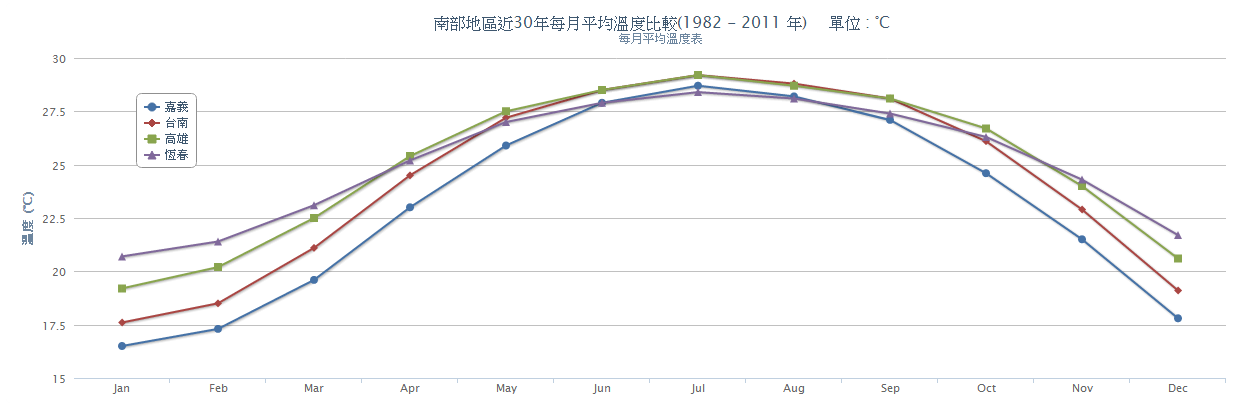
請問大大,如何能讓此在IE上呈現?
當時我所用的是IE9,是可呈現的,請問你版本是?