Spring Hello World Example 專案 之 Annotation 本範例實作說明: 本篇主要使用 Spring Framework,做一個基本測試專案, 有使用到 Spring bean 。 一、範例開發準備工具 作業系統: Windows 7 開發工具: Eclipse Java EE IDE for Web Developers Juno Service Release2 JAVA JDK : JDK 1.6 其它相關: Maven 4.0 Springframework 3.2.2.RELEASE 二、新增Maven範例專案 範例專案名稱: SpringAnnotationHelloWorldExample 圖1 開啟Eclipse -> File -> New -> Maven Project (如果找不到Maven Project ,請選Other..-> Maven -> Maven Project)
圖2 選擇專案存放位置 use default Workspase location-> Next 選擇存放在預設的工作資料夾下(就是你開Eclipse時,選擇Workspase下)
圖3 使用 Maven 範本 本例選用: Group id : org.apache.maven.archetypes Artifact id : maven-archetype-quickstart Version : 1.1 -> Next 註: Group id為公司名稱 or 群組分類名稱 Artifact Id 為專案標識符,就是專案名稱
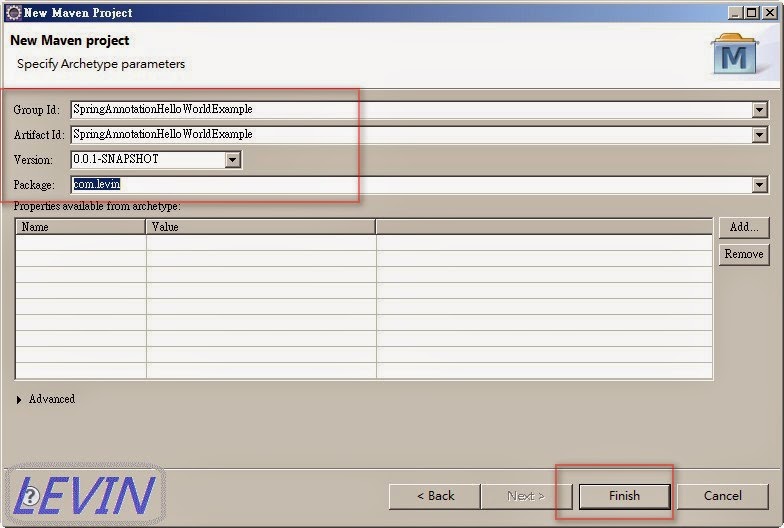
圖4 範例專案 Group id : SpringAnnotationHelloWorldExample Artifact id : SpringAnnotationHelloWorldExample Version : 0.0.1-SNAPSHOT Package : com.levin -> Finish
圖5 新增專案後,基本預設資料
三、使用相關jar檔
<dependency>
   <groupId>org.springframework</groupId>
   <artifactId>spring-core</artifactId>
   <version>${spring.version}</version>
  </dependency>

  <dependency>
   <groupId>org.springframework</groupId>
   <artifactId>spring-context</artifactId>
   <version>${spring.version}</version>
  </dependency>
圖6 開啟 pom.xml
<project xmlns="http://maven.apache.org/POM/4.0.0" xmlns:xsi="http://www.w3.org/2001/XMLSchema-instance"
 xsi:schemaLocation="http://maven.apache.org/POM/4.0.0 http://maven.apache.org/xsd/maven-4.0.0.xsd">
 <modelVersion>4.0.0</modelVersion>

 <groupId>SpringHelloWorldExample</groupId>
 <artifactId>SpringHelloWorldExample</artifactId>
 <version>0.0.1-SNAPSHOT</version>
 <packaging>jar</packaging>

 <name>SpringHelloWorldExample</name>
 <url>http://maven.apache.org</url>

 <properties>
  <project.build.sourceEncoding>UTF-8</project.build.sourceEncoding>
  <spring.version>3.2.2.RELEASE</spring.version>
  <jdk.version>1.6</jdk.version>
 </properties>

 <dependencies>
  <!-- Spring 3 dependencies -->
  <dependency>
   <groupId>org.springframework</groupId>
   <artifactId>spring-core</artifactId>
   <version>${spring.version}</version>
  </dependency>

  <dependency>
   <groupId>org.springframework</groupId>
   <artifactId>spring-context</artifactId>
   <version>${spring.version}</version>
  </dependency>
 </dependencies>

 <build>
  <finalName>SpringHelloWorldExample</finalName>
  <plugins>
   <plugin>
    <groupId>org.apache.maven.plugins</groupId>
    <artifactId>maven-eclipse-plugin</artifactId>
    <version>2.9</version>
    <configuration>
     <downloadSources>true</downloadSources>
     <downloadJavadocs>false</downloadJavadocs>
    </configuration>
   </plugin>
   <plugin>
    <groupId>org.apache.maven.plugins</groupId>
    <artifactId>maven-compiler-plugin</artifactId>
    <version>3.0</version>
    <configuration>
     <source>${jdk.version}</source>
     <target>${jdk.version}</target>
    </configuration>
   </plugin>
  </plugins>
 </build>
</project>
四、建立 Java 檔 建立三支Java 檔 路徑:src/main/java/com/levin 檔名: IHelloMessage.java HelloWorld.java Application.java 圖7
五、編輯 IHelloMessage.java 路徑檔名:src/main/java/com/levin/IHelloMessage.java
package com.levin;

public interface IHelloMessage {
    String getMessage();
}
六、編輯 HelloWorld.java 路徑檔名:src/main/java/com/levin/HelloWorld.java
package com.levin;


import org.springframework.beans.factory.annotation.Autowired;
import org.springframework.stereotype.Component;

@Component
public class HelloWorld {

    final private IHelloMessage service;

    @Autowired
    public HelloWorld(IHelloMessage service) {
        this.service = service;
    }

    public void printHello() {
        System.out.println(this.service.getMessage());
    }
}
七、編輯 Application.java 路徑檔名:src/main/java/com/levin/Application.java
package com.levin;

import org.springframework.context.ApplicationContext;
import org.springframework.context.annotation.*;

@Configuration
@ComponentScan
public class Application {

 @Bean
 IHelloMessage mockHelloMessage() {
  return new IHelloMessage() {
   public String getMessage() {
    return "Spring Framework Annotation Hello World!";
   }
  };
 }

 public static void main(String[] args) {
  ApplicationContext context = new AnnotationConfigApplicationContext(Application.class);
  HelloWorld printer = context.getBean(HelloWorld.class);
  printer.printHello();
 }
}
八、測試 - 執行 圖8 點選 Application.java ->在Application內容 按右鍵 -> Run As -> Java Application
圖9 執行結果
十二、其它參考 Struts + Spring + Hibernate 目錄 Spring Framework 首頁 [apache_Maven] Eclipse 裡 Maven 安裝教學

 ZK (1)